
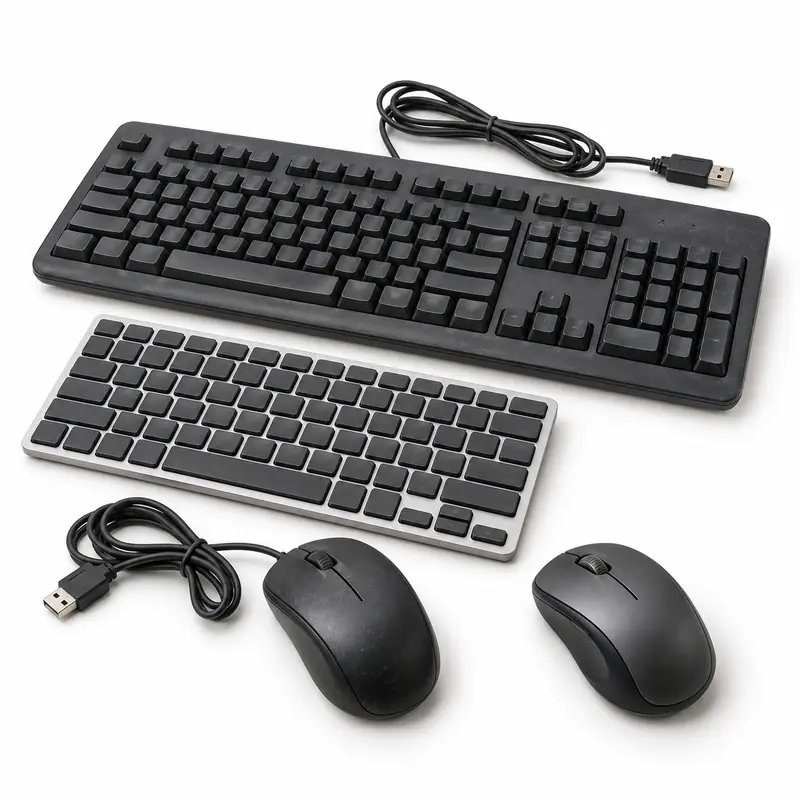
Keyboard and Mouse Scrap Guide

Old Keyboard and Mouse Scrap Pickup Options

Review accessory type, working condition, cable or receiver completeness and buyer-evaluation factors before requesting pickup.

Acceptance Varies by Buyer
Pickup Subject to Availability
Final Offer After Inspection
Old computer keyboards and mice prepared for electronic waste pickup evaluation

Request Keyboard and Mouse Scrap Pickup in 4 Simple Steps

Share accurate keyboard and mouse details, compare participating buyers and confirm acceptance and the final offer after inspection.

Add Keyboard and Mouse Details

Mention the item types, approximate quantity, working condition, completeness and clear photographs of the keyboards and mice.

Compare Buyer Options

Review participating buyers that may consider the disclosed keyboard and mouse scrap in your location.

Request Pickup

Choose an available collection option and confirm minimum quantity, access, handling and any pickup charge.

Confirm the Final Offer

The selected buyer confirms acceptance, classification, quantity, deductions and the final offer after inspection.

Old Keyboard and Mouse Scrap Pickup and Recycling Guide

Sell Keyboard and Mouse Scrap Online

Old keyboards and mice can contain reusable components and recyclable metals, circuit boards, plastic or other materials. BharatBin helps customers compare participating buyer options where available.

Before requesting collection, identify the exact keyboard and mouse type, approximate quantity, working condition, missing parts and relevant accessories. Clear photographs may help with a preliminary assessment. Buyers may consider device type, wired or wireless design, working condition, missing keys or buttons, cable and connector damage, battery condition, receiver or dongle availability, cleanliness and quantity. Details shared before pickup are not a guaranteed offer; the selected buyer confirms acceptance and final value after inspection.

Recycling Keyboard and Mouse Scrap

Materials and items that may be recoverable

Keyboards and mice contain plastic housings, small circuit boards, wiring, steel parts and sometimes removable or rechargeable batteries. Remove only ordinary user-replaceable batteries where safe and keep electronic accessories separate from general rubbish.

  • Household Scrap
  • Office Scrap
  • Bulk Quantities
  • Recyclable Materials
Item acceptance depends on the selected buyer, quantity, condition and pickup availability.

What to Confirm Before Keyboard and Mouse Scrap Pickup

Check accessory condition, cables and receivers

Before requesting collection, share the keyboard and mouse types, approximate quantity, wired or wireless design, working condition, missing keys or buttons, cable damage, receiver availability and battery status. Confirm accepted accessories, minimum quantity, pickup charge and slot, counting or weighing method, deductions, payment and available handover documentation with the selected buyer.

  • Accepted Input Devices
  • Wired or Wireless Type
  • Keys, Buttons and Cables
  • Receivers and Batteries
  • Pickup Charge and Slot
  • Evaluation and Payment
Share accurate item details before pickup. The selected buyer confirms acceptance, evaluation terms and the final offer after inspection.

Arrange Keyboard and Mouse Scrap Pickup

Keyboard and Mouse scrap pickup availability depends on the customer location, quantity, access and participating buyers operating nearby. Small quantities of input accessories may need to be combined with computers, monitors or other accepted e-waste for pickup.

Request Pickup
Material Price Guides

Related Material Rate Guides

Keyboards and mice may contain plastic housings, copper wiring, small circuit boards, steel parts and batteries in some wireless models. Use these material guides for general reference; participating buyers may assess complete accessories by type, condition, cable or receiver completeness and quantity.

These rate guides are for general reference. The final offer for keyboard and mouse scrap may depend on the accessory type, wired or wireless design, working condition, cable or connector damage, receiver completeness, battery status, quantity, location and buyer inspection.
Support Center

Frequently Asked
Questions

Have a question that isn't answered here? Find answers to common questions about scrap pickup options available through BharatBin.

Still have questions? Contact Support
What types of old keyboards and mice may participating buyers consider?
Participating buyers may consider wired and wireless keyboards, computer mice, trackballs, numeric keypads and related input accessories. Acceptance depends on the exact item type, condition, quantity, location and selected buyer requirements.
Can non-working or damaged keyboards and mice be included in a pickup request?
Some participating buyers may consider non-working or damaged keyboards and mice, but acceptance is not automatic. Share clear photographs and disclose the condition because evaluation may consider device type, wired or wireless design, working condition, missing keys or buttons, cable and connector damage, battery condition, receiver or dongle availability, cleanliness and quantity.
How are keyboard and mouse scrap offers evaluated?
A buyer may consider device type, wired or wireless design, working condition, missing keys or buttons, cable and connector damage, battery condition, receiver or dongle availability, cleanliness and quantity. Information or photographs shared before collection are preliminary; the selected buyer confirms the classification, deductions and final offer after inspection.
How should I prepare keyboards and mice for pickup?
Remove ordinary removable batteries, keep rechargeable devices intact, bundle cables loosely and pair wireless receivers with their devices. Wipe loose dust, disclose liquid damage or missing keys and do not cut cables, break housings or burn plastic.
Should batteries be removed from wireless keyboards and mice?
Remove ordinary user-replaceable batteries if they are not leaking and can be taken out without tools. Keep sealed rechargeable devices intact, disclose swelling or leakage and follow the provider's battery instructions.
Does a missing wireless receiver affect acceptance?
A missing USB receiver can reduce testability and reuse potential, but some buyers may still consider the accessory as e-waste. State whether each receiver, charging cable or adapter is included.
Is doorstep pickup always available for keyboards and mice?
No. Pickup depends on the customer location, item type, quantity, access and participating buyers operating nearby. A few accessories may not meet buyer thresholds and can often be listed with other accepted computer equipment. Confirm any minimum quantity or collection charge before booking.
Can businesses arrange bulk pickup for keyboards and mice?
Yes, offices, schools, gaming centres, computer labs and institutions may request collection for multiple units. Provide an itemised inventory, condition details, data or safety requirements, site access and preferred timing so participating buyers can assess the request.

Ready to Request Pickup for
Old Keyboard and Mouse?

Share the keyboard and mouse type, condition and approximate quantity, compare participating buyers and request an available collection option.