
Desktop Computer Scrap Guide

Old Desktop Computer Scrap Pickup Options

Understand data handling, system completeness and buyer-evaluation factors for old desktop computers before requesting an available pickup.

Acceptance Varies by Buyer
Pickup Subject to Availability
Final Offer After Inspection
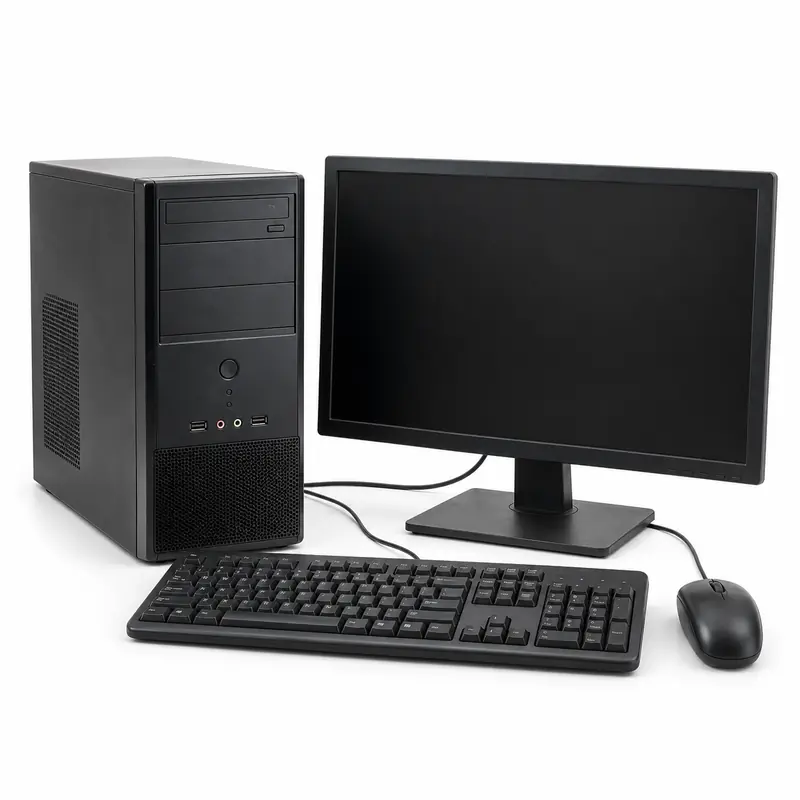
Old desktop computer tower, monitor, keyboard and mouse prepared for e-waste pickup

Request Desktop Computer Scrap Pickup in 4 Simple Steps

Share accurate desktop computer details, compare participating buyers and confirm acceptance and the final offer after inspection.

Add Desktop Computer Details

Mention the item types, approximate quantity, working condition, completeness and clear photographs of the desktop computers.

Compare Buyer Options

Review participating buyers that may consider the disclosed desktop computer scrap in your location.

Request Pickup

Choose an available collection option and confirm minimum quantity, access, handling and any pickup charge.

Confirm the Final Offer

The selected buyer confirms acceptance, classification, quantity, deductions and the final offer after inspection.

Old Desktop Computer Scrap Pickup and Recycling Guide

Sell Desktop Computer Scrap Online

Old desktop computers can contain reusable components and recyclable metals, circuit boards, plastic or other materials. BharatBin helps customers compare participating buyer options where available.

Before requesting collection, identify the exact desktop computer type, approximate quantity, working condition, missing parts and relevant accessories. Clear photographs may help with a preliminary assessment. Buyers may consider system brand or configuration, processor generation, memory, storage, graphics hardware, working condition, tower and peripheral completeness, data-bearing devices and reuse potential. Details shared before pickup are not a guaranteed offer; the selected buyer confirms acceptance and final value after inspection.

Recycling Desktop Computer Scrap

Materials and items that may be recoverable

Desktop systems combine circuit boards, storage devices, copper wiring, aluminium heat sinks, steel cases, plastic and displays. Keep components intact and dry, handle data-bearing drives separately where policy requires, and avoid breaking screens or stripping parts.

  • Household Scrap
  • Office Scrap
  • Bulk Quantities
  • Recyclable Materials
Item acceptance depends on the selected buyer, quantity, condition and pickup availability.

What to Confirm Before Desktop Computer Scrap Pickup

Check system inventory, data and pickup access

Before requesting collection, list the tower, monitor, keyboard, mouse, cables and other included peripherals, along with processor, memory and storage details where known. Confirm data handling, accepted components, testing, minimum quantity, carrying or loading responsibility, pickup charges, collection slot, deductions and payment with the selected buyer.

  • Included System Components
  • Specifications and Condition
  • Storage and Data Handling
  • Testing and Evaluation
  • Loading, Charge and Slot
  • Final Offer and Payment
Share accurate item details before pickup. The selected buyer confirms acceptance, evaluation terms and the final offer after inspection.

Arrange Desktop Computer Scrap Pickup

Desktop Computer scrap pickup availability depends on the customer location, quantity, access and participating buyers operating nearby. Complete systems and multi-unit office lots may be assessed differently from isolated towers or peripherals, and access or loading terms should be confirmed.

Request Pickup
Material Price Guides

Related Material Rate Guides

Desktop computer systems may contain steel cases, aluminium heat sinks, copper wiring, circuit boards, storage devices, plastic and display components. Use these material guides for general reference; participating buyers may assess complete systems by specifications, condition and completeness rather than as one mixed-material weight.

These rate guides are for general reference. The final offer for desktop computer scrap may depend on the system configuration, processor generation, memory and storage, working condition, included peripherals, completeness, quantity, location and buyer inspection.
Support Center

Frequently Asked
Questions

Have a question that isn't answered here? Find answers to common questions about scrap pickup options available through BharatBin.

Still have questions? Contact Support
What types of old desktop computers may participating buyers consider?
Participating buyers may consider complete desktop systems, office PCs, home computers, workstations and non-working computer sets. Acceptance depends on the exact item type, condition, quantity, location and selected buyer requirements.
Can non-working or damaged desktop computers be included in a pickup request?
Some participating buyers may consider non-working or damaged desktop computers, but acceptance is not automatic. Share clear photographs and disclose the condition because evaluation may consider system brand or configuration, processor generation, memory, storage, graphics hardware, working condition, tower and peripheral completeness, data-bearing devices and reuse potential.
How are desktop computer scrap offers evaluated?
A buyer may consider system brand or configuration, processor generation, memory, storage, graphics hardware, working condition, tower and peripheral completeness, data-bearing devices and reuse potential. Information or photographs shared before collection are preliminary; the selected buyer confirms the classification, deductions and final offer after inspection.
How should I prepare desktop computers for pickup?
Create an itemised list of the tower, monitor, keyboard, mouse, cables and storage devices. Back up and erase required data, shut equipment down, bundle loose cables and disclose missing drives, damaged screens, liquid exposure or inaccessible collection areas.
Is a complete desktop system assessed differently from a CPU tower?
It may be. A complete system can include a tower, monitor, keyboard, mouse and cables, while a tower-only request has a different inventory. List every included component so the buyer can assess the request accurately.
How should multiple office desktops be prepared?
Provide an itemised inventory with asset counts, specifications where available, working condition, missing parts, data-handling requirements, floor level, lift access and loading restrictions. Keep matched cables or peripherals grouped when practical.
Is doorstep pickup always available for desktop computers?
No. Pickup depends on the customer location, item type, quantity, access and participating buyers operating nearby. A complete system may be considered individually, while tower-only or peripheral-only requests can be subject to minimum quantities. Confirm any minimum quantity or collection charge before booking.
Can businesses arrange bulk pickup for desktop computers?
Yes, offices, schools, computer labs, retailers and institutions may request collection for multiple units. Provide an itemised inventory, condition details, data or safety requirements, site access and preferred timing so participating buyers can assess the request.

Ready to Request Pickup for
Old Desktop Computer?

Share the desktop computer type, condition and approximate quantity, compare participating buyers and request an available collection option.